
ClassRanked Data Flow
⚙️ How Data Flows Between Your Systems and ClassRanked
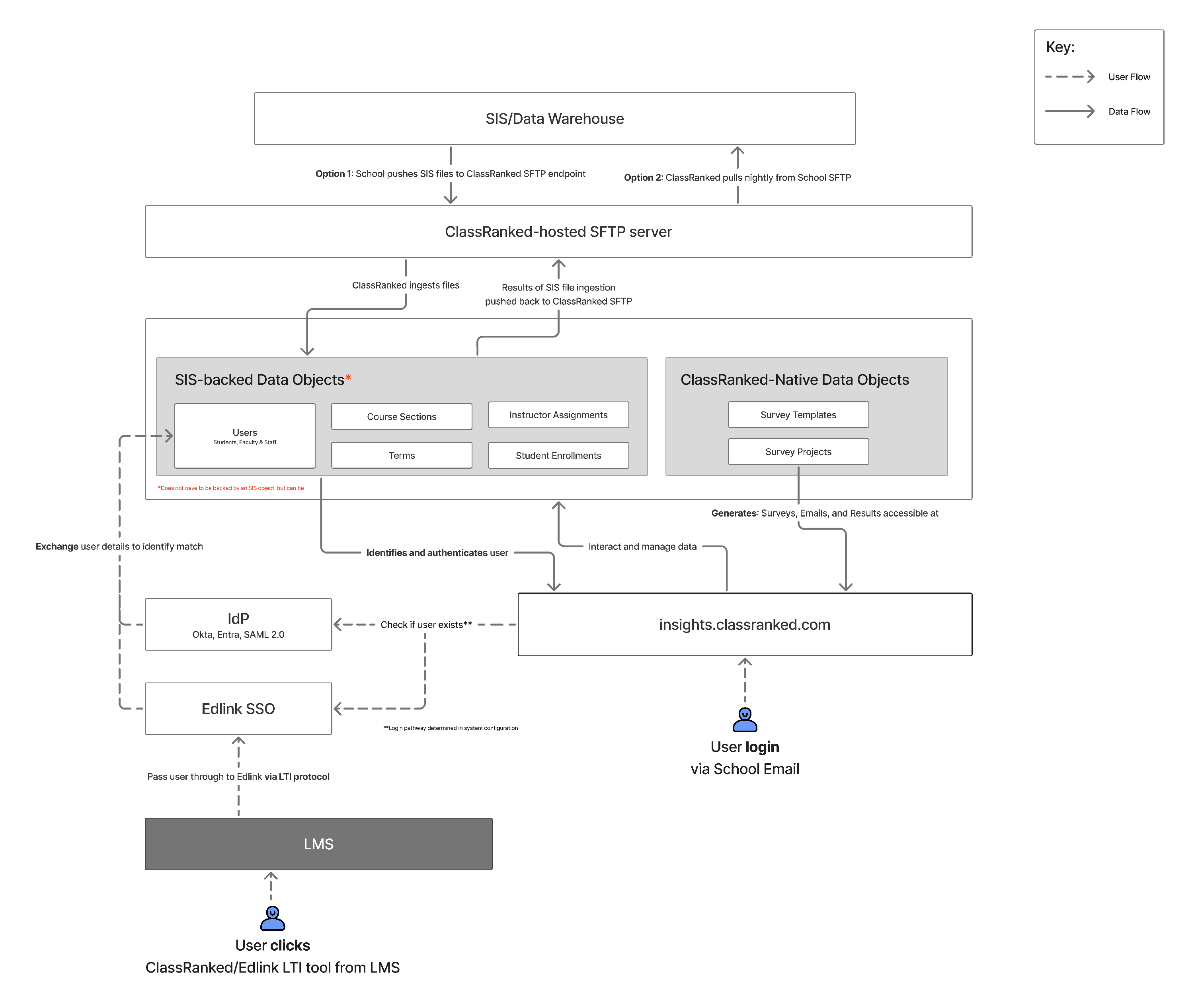
The following diagram outlines how ClassRanked integrates with your school’s systems, including the SIS/Data Warehouse, LMS, and Identity Provider. It highlights:
- How student, course, and enrollment data is imported
- How authentication is handled via SSO or Edlink
- Where survey templates, responses, and reports are managed
Use this as a reference when setting up your data feeds, configuring SFTP access, or verifying SSO behavior. For technical specs, sync frequency, and data field mappings, see the related documentation linked below.
🗺 Integration Options
ClassRanked supports two SIS file delivery approaches:
- Option A: School pushes files to a ClassRanked-hosted SFTP endpoint
- Option B: ClassRanked pulls files from a school-hosted SFTP location
Nightly syncs run on a defined schedule. For file format requirements and expected fields, see the SIS File Guide.
🔐 Authentication Flow (SSO and Edlink)
ClassRanked supports both IdP-based SSO (Okta, Azure, SAML 2.0) and Edlink-authenticated LMS flows.
- Primary identity source (IdP or Edlink) is configurable.
- Users are matched via email address (case-insensitive).
- LMS-based access is passed via LTI → Edlink → ClassRanked.
See: SSO Setup with Okta | SSO Setup with Entra | Learn more about Edlink
📂 Data Types and Ownership
- Inbound Data (from SIS/LMS):
- Users, Course Sections, Enrollments, Instructor Assignments, Terms
- Managed in ClassRanked:
- Survey Templates, Survey Projects, Survey Results
All data is encrypted in transit and at rest. Files are retained in line with the school’s data agreement.