Setup ClassRanked Single Sign-on with Microsoft Entra
Prerequisites from ClassRanked
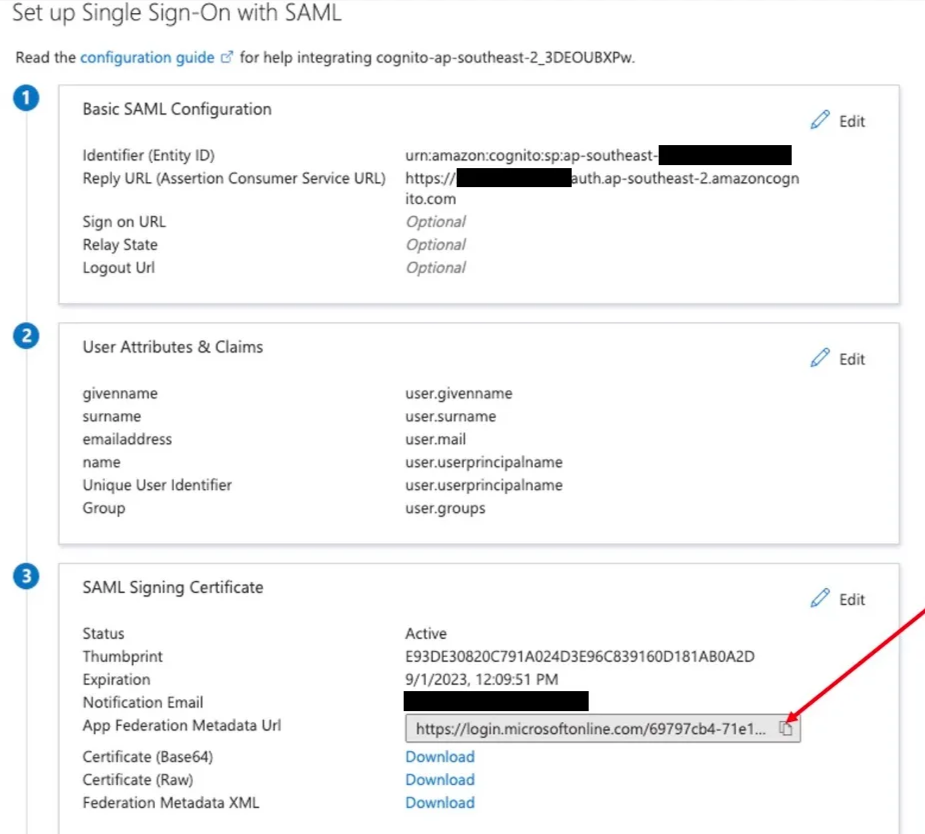
You will need two pieces of information from ClassRanked:
- Reply URL
- Format: https://
COGNITO_APP_CLIENT_USER_POOL_DOMAIN_NAME/saml2/idpresponse
- Format: https://
- Identifier/Entity ID
- Format: urn:amazon:cognito:sp:
USER_POOL_ID_FROM_COGNITO
- Format: urn:amazon:cognito:sp:
Setup Steps
SAML Configuration
- Create AWS Single-Account Access in Microsoft enterprise applications
-
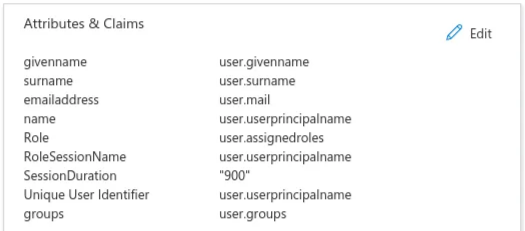
Configure the attributes and claims as shown in the provided image
Final Step
- Once you are done, in the section “SAML Signing Certificate”, copy the “App Federation Metadata URL” and provide this to ClassRanked.