
Setup ClassRanked Single Sign-on with Okta
Prerequisites from ClassRanked
You will receive three items from ClassRanked:
- Single Sign-on URI
- Format: https://
COGNITO_APP_CLIENT_USER_POOL_DOMAIN_NAME/saml2/idpresponse
- Format: https://
- Audience URI
- Format: urn:amazon:cognito:sp:
USER_POOL_ID_FROM_COGNITO
- Format: urn:amazon:cognito:sp:
- [DEPRECATED] Signature Certificate (.crt file)
Setup Steps
Configure SAML Settings
- Go to “Configure SAML” tab and set the following fields:
- Single sign-on URL: Use ClassRanked provided Single Sign-on URI
-
Audience URI (SP Entity ID): Use ClassRanked provided Audience URI
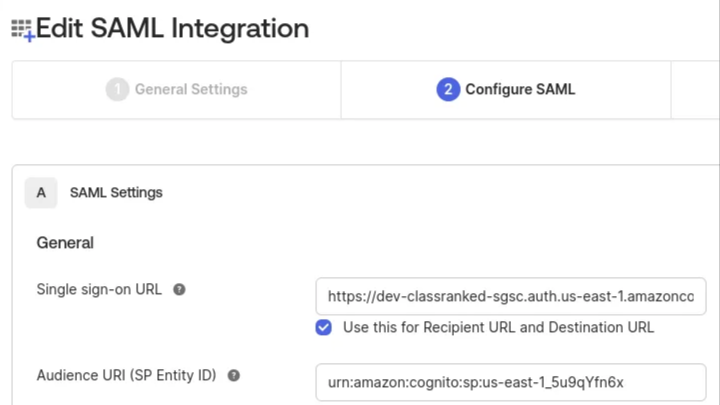
Also set the following fields:
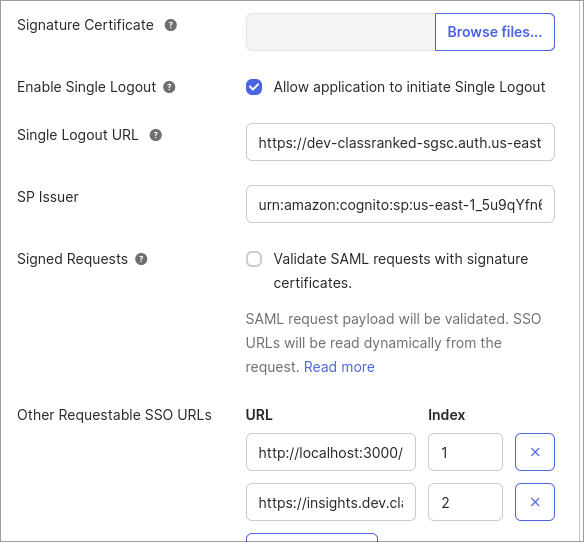
- Single Logout URL: Use ClassRanked provided Single Sign-on URI
- SP issuer: Use ClassRanked provided Audience URI
- Other Request-able SSO URLs: https://insights.classranked.com
- (OPTIONAL) Enable single logout
- [DEPRECATED] Add Signature Certificate (provided by ClassRanked via our AWS console)
- In Okta's Advanced Settings, add the following Attribute Statements:
http://schemas.xmlsoap.org/ws/2005/05/identity/claims/emailaddress |
user.email |
http://schemas.xmlsoap.org/ws/2005/05/identity/claims/surname |
user.lastName |
http://schemas.xmlsoap.org/ws/2005/05/identity/claims/givenname |
user.firstName |

Final Step
- After configuration is complete, locate the SAML 2.0 Metadata URL in Settings and provide this URL to ClassRanked.
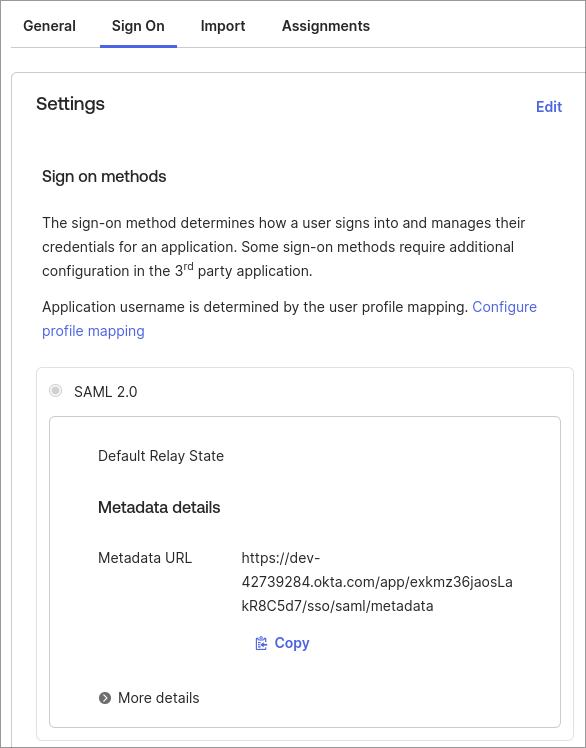
Considerations
- Due to security concerns, the ClassRanked SAML application is not configured to support IdP initiated SAML sign in.
- To prevent users from seeing confusing error pages.
- Hide the ClassRanked application from the Okta homepage.
- Create a new bookmark that links to the ClassRanked application: https://insights.classranked.com
- To prevent users from seeing confusing error pages.