
Signing into ClassRanked
🚪 How to Sign In to ClassRanked
You can access ClassRanked surveys or results at insights.classranked.com in a few different ways depending on how your school has set up access.
📥 How Did You Get Here?
Choose the option that best describes how you landed on the site:
1. From Your LMS (Canvas, Moodle, D2L, etc.)
You clicked on the ClassRanked or Course Evaluations link inside your LMS.

✅ You’ll log in automatically—no password needed.
⚠️ If you see an error or you’re not logged in, check the FAQ.
2. From an Email
You received a survey reminder or invitation directly from noreply@classranked.com.

🔗 Clicking on any of the links or buttons in that email takes you to the login screen, where you’ll enter your school email.
3. From a Link or QR Code
You received a link or scanned a QR code from a flyer, email, or professor.
⚠️ This opens insights.classranked.com. If you have not authenticated into ClassRanked before, you will still need to log in manually.
🔐 Signing In: What Happens Next
Once you're on the login page:

-
Enter your school email address
Use the same email you use for Canvas / school login.
If your school has aliases (e.g.
crs123@school.eduandclassranked.student@school.edu), try both if needed. - Click Continue
- You’ll be directed to your school’s login flow based on how your school set it up
🎓 Login Flow Options
First-time LMS-Based Login
If your school uses Canvas, Moodle, Brightspace, or Blackboard:
-
Enter your email
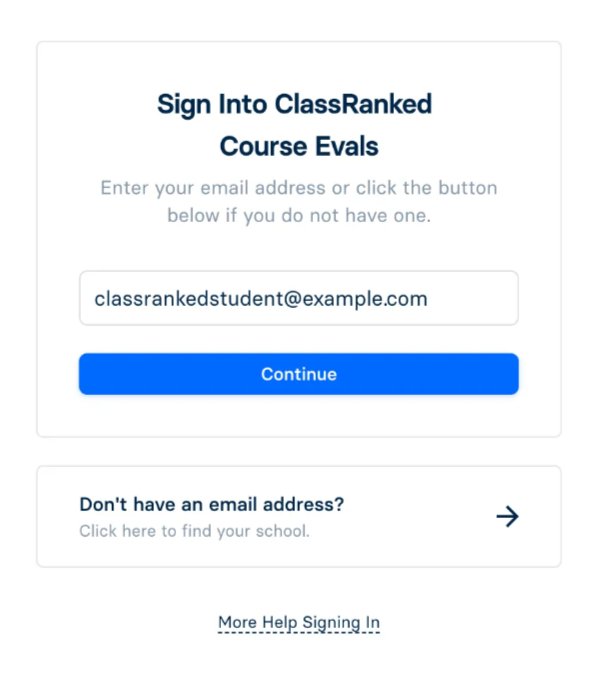
- (Uncommon) If your school uses multiple LMS’s, select your primary LMS.

- You will be prompted to login to your LMS, as you would normally. If you’re lucky, you may already be logged in (woo hoo 🎉).
- Authorize the connection via Edlink (our integration partner).

- You will be redirected back into ClassRanked
💡 You’ll only need to do this once. Future logins will skip the setup steps.
SSO Login (Okta, Microsoft, Shibboleth, etc.)
If your school uses a Single Sign-On system:
- If you’re already signed in, you’ll be taken straight into ClassRanked.
- Otherwise, you’ll:

- Get redirected to your SSO login (matches your email).
- Authenticate and land in ClassRanked.
If your school uses ClassRanked’s built-in login:

You’ll receive your credentials by email from:
noreply@classranked.com, ornoreply@classranked.ccsend.com
Questions?
If you run into issues logging in, refer to our Sign in FAQs!